
Will my phone work?
What Is DisplayPort Alt Mode? (And Does Your Phone Have It?)
DisplayPort Alt Mode (DP Alt Mode) is a USB-C feature that lets a phone send a DisplayPort video signal out of its USB-C port. A USB-C to HDMI cable or adapter turns that signal into HDMI, so your TV or monitor shows the phone's screen. It is hardware: the phone's chipset and port wiring must support it and the maker must turn it on. No app or setting can add it.
On this page
If you have ever plugged a USB-C to HDMI cable into a phone and seen "No signal" on the TV, DisplayPort Alt Mode is almost always the reason. Some phones have it and some do not, and nothing on the box usually tells you. This guide explains what it is in plain terms, how to find out whether your phone supports it, and how it compares with the older and app-based alternatives.
What DisplayPort Alt Mode actually does
A USB-C port is just a connector. What travels through it depends on what the phone puts on its pins. Every USB-C port carries power and basic USB data. Some also have extra high-speed wire pairs, called lanes, that are used for fast USB 3.x data.
"Alternate mode" means the phone can hand some of those high-speed lanes over to a different protocol. In DP Alt Mode, that protocol is DisplayPort, the same video standard used by many computer monitors. The phone and the cable agree on the switch when you plug in, and the lanes start carrying a video signal instead of (or alongside) USB data.
Your TV has HDMI, not DisplayPort, so a USB-C to HDMI cable has a small converter chip inside that turns DisplayPort into HDMI. That is all a plain USB-C to HDMI cable does. It does not create video. It only converts video the phone is already sending.
Why USB 2.0 ports cannot do it
Many phones, especially budget and mid-range models, have a USB-C connector wired only for USB 2.0. That kind of port has no high-speed lanes at all, so there is nothing to switch over to DisplayPort. It still charges and still moves files, just more slowly. This is why "it has USB-C" and "it charges fine" tell you nothing about USB-C video output.
Chipset plus maker: both have to say yes
Even with a USB 3.x port, DP Alt Mode only works if two things line up:
- The chipset (the phone's processor) must have a display output that can be routed to the USB-C port.
- The maker must wire the port for it and enable it in the software.
Makers sometimes leave it off. For example, Google Pixel phones only got DisplayPort output with Android 16, and only on the Pixel 8 and later. Pixel 7 and older still do not have it. That is why the same chipset can give video out on one phone and nothing on another.
No app, setting or OTG trick can add DisplayPort Alt Mode. If the hardware or the maker's software does not support it, a USB-C to HDMI cable will never show a picture on that phone. Apps that claim otherwise are not telling the truth, and that includes ours: the USB-C to HDMI app checks for support, it does not create it.
Which phones have DP Alt Mode?
In short, mostly flagships. Samsung Galaxy S8 and newer S models, Galaxy Note 8 and newer, the Galaxy Z Fold series, Galaxy Tab S tablets, Google Pixel 8 and newer (with Android 16), Sony Xperia 1 and 5, Huawei Mate and P flagships, several Motorola Edge Pro and Ultra models, ASUS ROG Phone and some LG G and V flagships. Most budget phones, including most Galaxy A models, Redmi, POCO, OnePlus and moto g/e, do not. The full brand-by-brand tables are on our list of phones that support HDMI output.
iPhone 15 and newer also send video over USB-C, but this site and our app are for Android phones.
How to check if your phone supports DisplayPort Alt Mode
You can check for free, in a few minutes, before you spend money on a cable. Try these in order.
- Read the spec sheet. Search for your exact model number plus "specifications" on the maker's site. Look for "DisplayPort", "DP Alt Mode", "video output", "USB 3.1/3.2" or a DeX/desktop mode. If the only USB line says "USB 2.0", the phone cannot do it.
- Look at the port and the box. A few devices print a small DisplayPort logo (a "D" shape with a "P" inside) next to the USB-C port or on the packaging. Very few phones do this, so a missing logo proves nothing, but a present one is a good sign.
- Run the compatibility check in the app. Install the free USB-C to HDMI app. On first launch it gives a verdict for your phone model: likely, unlikely or unknown, based on the same database as our phone list.
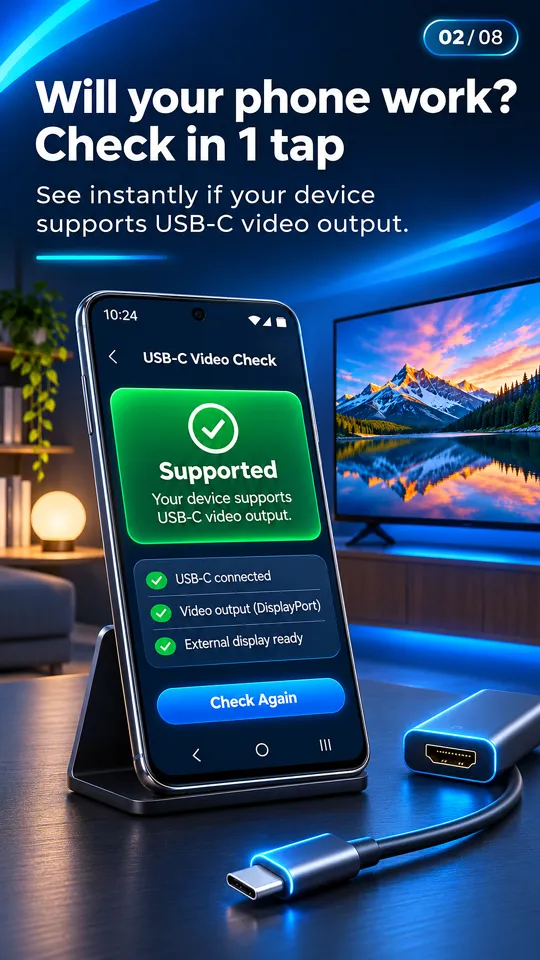
The app's first-run compatibility check gives a likely, unlikely or unknown verdict for your model. - Plug in a cable. The final proof is a real test. Connect a USB-C to HDMI cable to the phone and the TV, unlock the phone and switch the TV to the right HDMI input. With the app open, the HDMI card turns green and shows the TV's resolution and refresh rate when the phone detects a display.
Tip: if you test with a borrowed cable and get nothing, try a second one before giving up. Charge-only USB-C cables carry no video, and some adapters need a charger plugged into them to work. Our USB-C to HDMI adapter guide explains what to look for.
What you get when DP Alt Mode works
On a supported phone, a cable gives you a mirrored copy of your screen on the TV, with sound through the TV speakers. There is no Wi-Fi involved and no lag worth noticing. Resolution depends on the phone and the adapter, often 1080p or 4K.
Samsung phones and tablets open Samsung DeX instead, a desktop-style interface, unless you switch it off. Many apps stay in portrait on the TV unless you rotate the phone. The step-by-step setup is in how to connect a phone to a TV with HDMI.
DP Alt Mode vs MHL vs DisplayLink
Three different technologies get sold as "phone to HDMI". They are not interchangeable.
| DisplayPort Alt Mode | MHL | DisplayLink / app-based | |
|---|---|---|---|
| Port | USB-C | Micro-USB (older phones) | USB-C or USB |
| Era | Current phones | Roughly 2011–2016 | Current |
| Phone needs built-in support? | Yes (hardware) | Yes (hardware) | No, but needs the adapter's driver app |
| Cable type | Plain USB-C to HDMI cable or adapter | MHL adapter | Adapter with its own chip |
| Picture quality and lag | Full quality, no lag | Good for its time | Lower quality, more latency |
| On today's phones | Most flagships | Almost none | Depends on the adapter's app |
MHL was the micro-USB answer to the same problem, found on early Galaxy S and Note phones and some Sony, LG and HTC models. Almost no current phone supports it, and an MHL adapter will not work on a phone without it. More in our MHL checker guide.
DisplayLink and other app-based adapters contain their own video chip and need a driver app named in their manual. They can work on phones without DP Alt Mode, but at lower quality and with more delay than a plain cable on a supported phone.
If your phone does not have DP Alt Mode
You can still get photos and videos on the TV, just not over a plain cable. The options are Chromecast or Google TV casting, the phone's built-in Screen mirroring or Smart View (Miracast) to a smart TV, DLNA casting to smart TVs, or opening an address in the TV's web browser. Our app does the Chromecast, DLNA and Browser Cast parts for photos and videos. Some of these methods even work with no router, as explained in how to connect a phone to a TV without Wi-Fi.
Questions people ask
What is DP Alt Mode on a phone?
It is a USB-C feature that sends a DisplayPort video signal out of the phone's charging port. With a USB-C to HDMI cable, it shows your phone's screen on a TV or monitor. The phone's hardware and software must support it.
Does my phone support DisplayPort Alt Mode?
Check the spec sheet for "DisplayPort" or USB 3.x, run the free compatibility check in the USB-C to HDMI app, or test with a USB-C to HDMI cable. If the spec sheet says USB 2.0 only, it does not.
Can I enable DisplayPort Alt Mode on my phone?
No. There is no setting, app or root trick that adds it. Either the chipset, the port wiring and the maker's software support it, or the phone cannot output video over USB-C.
Does every USB-C phone have video output?
No. Many USB-C phones, especially budget models, only have a USB 2.0 port, which cannot carry video. Charging and file transfer working over USB-C does not mean video will work.
Is DP Alt Mode the same as MHL?
No. Both put a phone on a TV by cable, but MHL is an older micro-USB standard from about 2011 to 2016. Current phones use DP Alt Mode, and MHL adapters do not work on them.